
Demo 1.0.3Reviewed 2026-09-29Upgrade effects and spending checks

Choose between coins, bots & sorting coverage

For more coins from completed shelves, compare coin-multiplier upgrades. For help shelving books, compare bot upgrades. For filling several shelves, inspect trigger effects. For wider Sorting spell coverage, check its column upgrades. If a robot has stopped at a shelf filled with wrong books, clear the obstruction before spending.

New to upgrades? Find the controls and check your first purchase ↓ · Bought Stack Sorting but cannot see its effect?

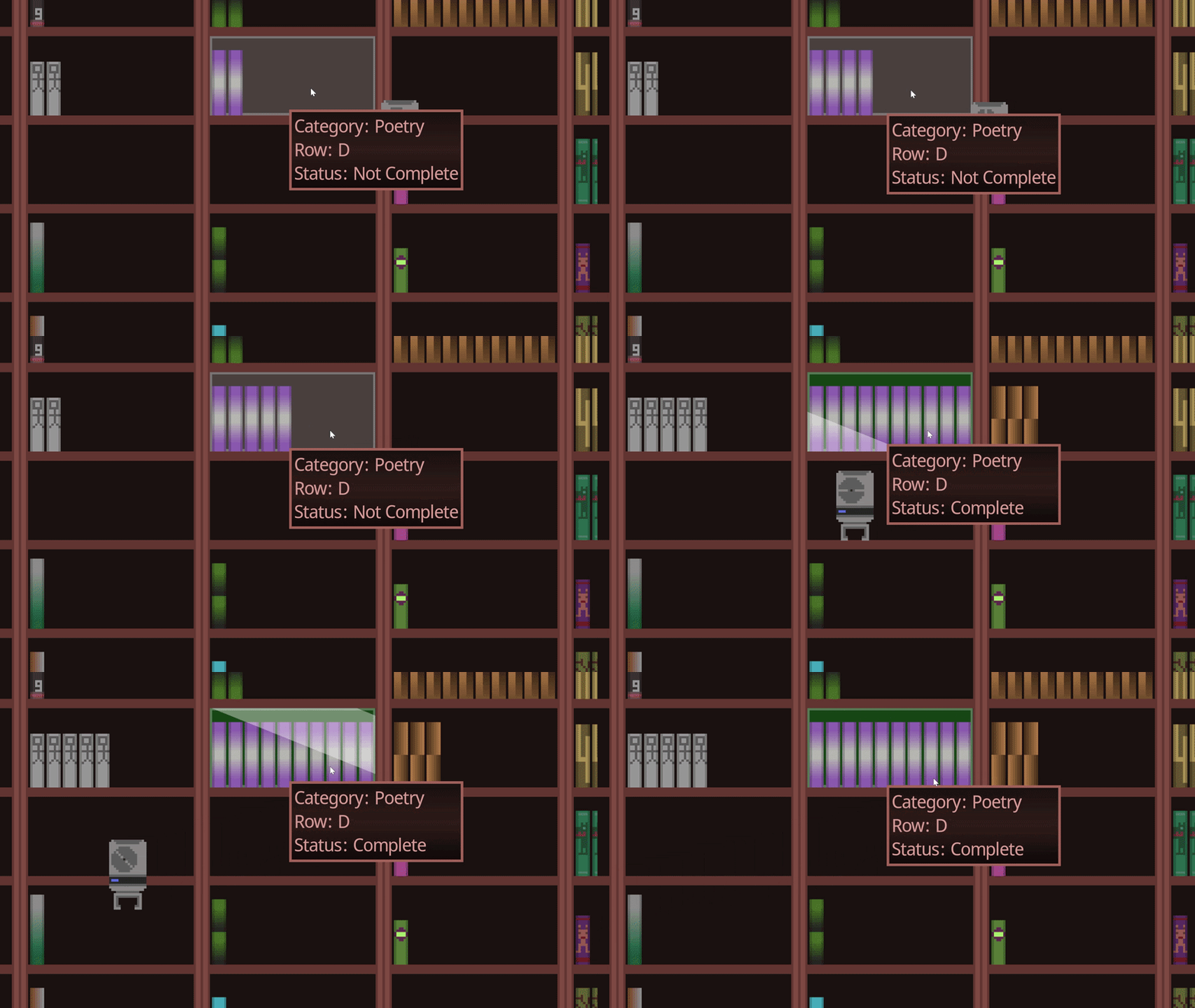
A robot approaching a shelf as its status changes from Not Complete to Complete
Inblue Games promotional footage: shelf completion and a robot. It does not show current upgrade prices.

Find the upgrades before spending your first coins

Upgrades can be easy to overlook while you are focused on the books. Start with the controls on the left: players on the official itch.io page have reported missing them until late in a run.

  1. Complete a shelf, then inspect the upgrade controls

    Complete a set of 10 identical books on its shelf to earn coins. Check the upgrade buttons on the left rather than waiting for a new spell to appear among the books. If you prefer manual sorting, you can leave automation purchases alone.

  2. Read the description, cost and stats

    The developer explains that these appear when you hover over an upgrade button . If they are not visible, do not buy an unidentified effect based on the icon alone. Report the missing tooltip with your platform and browser.

  3. Match the effect to the task you want help with

    Use the effect comparison below to distinguish earning more coins, adding helpers, triggering shelves and expanding columns. Compare the current level with the next purchase; a patch’s maximum range is not the effect of every upgrade level.

This guide covers documented effects and purchase checks. It does not establish exact current prices, a universal tier list, a best first purchase or payback times. The original overview also describes permanent progress between runs, but the inheritance rules are not detailed enough here to recommend a reset.

How do you use the Stack Sorting spell?

One Steam player, weremound, asked how to use it on September 30, then reported that the sorting happened when they bought it. That is one player’s self-correction, not a developer-confirmed rule for every spell or build. No separate cast key is established by that report. [1]

  1. Inspect the effect you actually purchased

    Hover over its upgrade button and read the current description and level. Distinguish Stack Sorting from bot and shelf-trigger upgrades; their effects solve different tasks.

  2. Check the affected stacks before buying another level

    Look for a change in the spell’s current coverage. The official 1.0.2 notes extended Sorting coverage to ten columns; they do not say every level covers ten columns, or that the purchase sorts every shelf in the archive. Do not use a book’s title initial or cover color as proof that sorting has failed; use the displayed-letter and category checks.

  3. Report a remaining mismatch precisely

    If the effect still differs from its description, record the spell name, level, Demo version and affected stacks before and after the purchase. Do not spend more coins solely to search for an undocumented activation button.

What each option helps you change

These are conditional choices based on documented effects, not a fastest purchasing order. The current cost and level shown in your Demo determine what you can buy.

Coin multipliers: income from completion

Consider when: you are completing shelves and want more coins for subsequent purchases. The developer describes multipliers as increasing the coins you earn.

Separate from: getting a book onto the correct shelf. A higher coin return does not by itself clear a wrong book or enlarge the Sorting spell’s coverage.

Bots: more shelving help

Consider when: you want automated helpers alongside manual sorting. The developer lists increasing the number of bots as an upgrade path.

Check first: a bot waiting at a full shelf may be blocked by a wrong book. Another bot does not remove that obstruction; use the clearance steps below.

Triggers: filling multiple shelves

Consider when: you want an effect that can fill several shelves, rather than an increase in coins per completion. The official description distinguishes these trigger effects from bots and multipliers.

Version check: the 1.0.2 patch fixed the left/right Shelf Trigger Spell for all robots. That is a compatibility fix, not a measured speed bonus or proof that this should be your first purchase.

Sorting spell: column coverage

Consider when: the limit you want to expand is the spell’s sorting coverage. In 1.0.2, the developer extended it from 8 to 10 columns.

Do not confuse: ten columns of coverage with the ten identical books required to complete one shelf. Check the spell’s current level and next upgrade in the game; the patch note does not list every level’s range or cost.

Inblue Games describes these effects in the developer’s upgrade overview and the 1.0.2 spell changes .

Compare bots, triggers and no-automation runs

The Demo supports different ways to spend attention. The table separates documented effects from player-run formats; it is not a universal priority list or a measured fastest build.

Swipe or scroll the comparison sideways to read all four columns.

Play styleWhat changesUse it whenDo not infer
Manual / no automationYou choose not to buy or rely on bot helpers and sort the shelves yourself.You want a hands-on sorting session or a no-automation comparison.Comments describing a no-bots run do not define an official mode, benchmark or required route.
Bot-supportedThe developer describes increasing the number of bots as an upgrade path for automated shelving.You want helpers working alongside manual sorting.More bots do not automatically clear a wrong book blocking a full shelf.
Trigger-supportedTrigger effects can fill multiple shelves; the 1.0.2 update says the left/right Shelf Trigger Spell works properly for all robots.You want an effect that acts across shelves after the current level supports it.The patch confirms compatibility, not a fixed seconds-saved value or best purchase order.
HybridYou sort enough to open space, then let helpers or triggers handle suitable shelves.You want to compare attention and automation without treating either as mandatory.Anecdotal bot-only or hybrid times cannot be compared unless the run conditions match.

Recent itch.io player comments include no-automation, no-bots and bot-focused runs. They are useful play-style examples, not an audited ranking.

A stopped robot can need space, not an upgrade

  1. Inspect the destination shelf

    The 1.0.1 notes describe a bot waiting when wrong books occupy all the available space. This specific symptom has a sorting fix.

  2. Remove the wrong book

    In Demo 1.0.3, hold the left mouse button on a shelved book to return it to the stack. Clear the misplaced book, then check whether the bot can continue.

  3. Use the metal plate for an empty stack

    When placing a book onto an empty stack, click its metal plate, not the empty background. An unresponsive empty area is not evidence that you need another upgrade.

Official blocked-bot and empty-stack behavior ; 1.0.3 removal control . These steps address the documented obstruction, not every possible robot fault.

Sources & verification for spell activation

  1. weremound, September 30, 2026, posts #17–18 in Steam: Demo Feedback purchase report . A single player reports an effect on purchase; the site has not reproduced it. itch.io: official 1.0.2 column-coverage note supports the coverage limit, not a universal activation rule.

Back to spell checks ↑

Continue with your current task

Recover a missing book

Follow the developer’s re-entry advice and save safely.

Open save guide →

Planning a manual sorting run? Check the official demo playtime estimates and no-upgrade completion note before setting aside a session.